
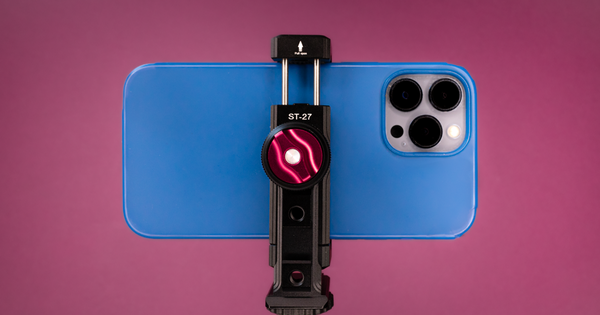
In 2020, when Camo first enabled professionals and creators to use their phone‘s advanced camera as a webcam, the world of phone mounts was a dark and scary place. Up to that point, mounting phones was a process typically reserved for cars, and the range of suction cup, gooseneck, magnetic and stick-on options were really just automotive phone-mounting solutions translated (poorly) for the desktop environment.
Happily, quite a bit has changed in the few years since then. For one thing, some phone makers have now begun baking phone-as-a-webcam capability directly into their devices. Add this to the huge upswing in the number of people creating social content directly on their phone, and you get a rapidly expanding universe of video-related phone accessories.
This guide is designed to help you sift quickly through all the choices out there, and find the mount that‘s best for you. My recommendations cover a range of use cases and budgets, but each one meets most or all of my primary criteria for a good mount, which are quick mountability, ease of positioning and good stability (bonus points if it looks nice). I‘ve broken the options down into these basic categories:
Disclaimer: This study has been conducted independently. Reincubate isn‘t affiliated with any of these products, and doesn‘t receive compensation for mentioning them.
Balanced and boom arm mounts
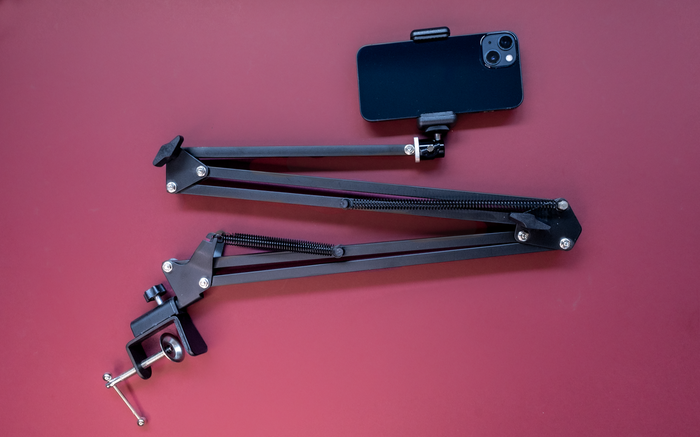
Budget pick: Tarion balanced arm mount (£28/$26)
Pro pick: Ulanzi articulated arm mount (£85/$80)
Anyone familiar with the humble task lamp will recognise the wonder of industrial engineering that is the balanced arm. Also sometimes called the floating or swing arm, it‘s a lovely example of physics at work, with simple springs counteracting the force of gravity, regardless of how the arm is positioned.
Happily, it turns out that what works so well for lamps and Pixar mascots is also pretty handy for mounting phones. The simple clamp can be attached easily to most desks, multiple points of articulation allow you to swing your phone into webcam mode fairly quickly, and you can move it back out of the way when it's not in use. No more wrestling with those stiff gooseneck arms that work pretty well for cars, but are always a bit of a struggle on a desk.
Another plus is that balanced arm mounts are relatively affordable, with serviceable models to be had for about £25/$25. Be careful of the supercheap options, though - in my experience, these can be made of lower quality materials, break easily, or have dimensions that make them too small for many desks. I recommend that you double-check the size before buying, always read the reviews, and buy from a seller with a good return policy in case you‘re not completely happy with your selection.
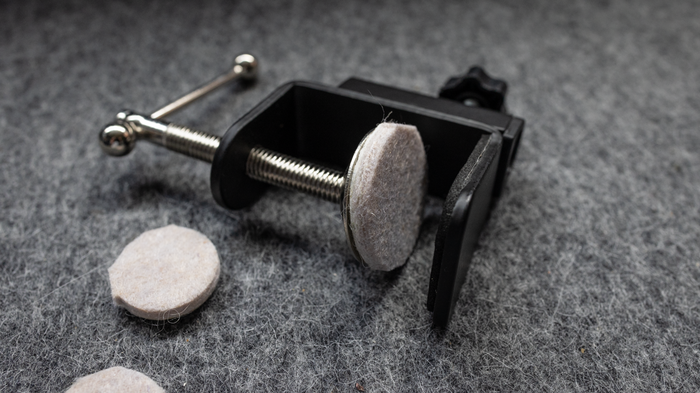
To protect my desk surface when attaching the clamp, I add one or two adhesive felt floor protectors.
Basic balanced arm mounts work well for phones and relatively compact desk areas, but if you think that you‘ll be wanting to mount something heftier, or need a bit more reach, you might consider a more robust articulating arm system. These often have a solid mounting pole that offers a firm anchor for anything from a phone to a video light to a microphone, with enough arm length that can extend across a good deal of real estate. They can also be expandable - the Ulanzi‘s base can accommodate additional arms, and has an attachment point on the top for fitting a video light. My Camo colleague Eden uses this model every day to hold either her phone or mirrorless camera for both meetings and content creation, and she loves it.
Stand mounts
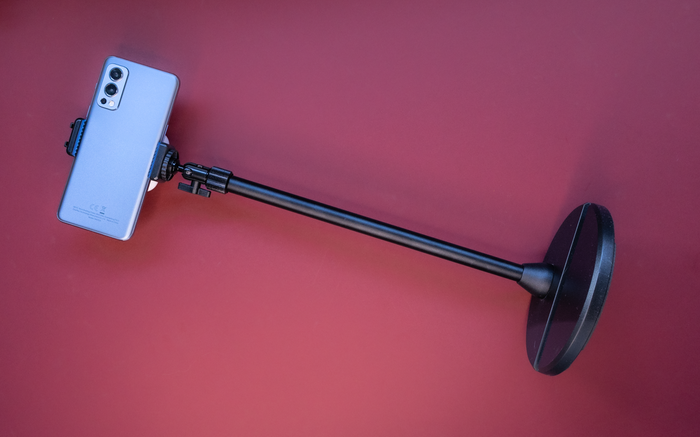
Budget pick: Etubby phone stand (£29/$25)
Pro pick: Elgato Mini Mount (£50/$50)
A second good option for desk-based video - and one that‘s more portable than a boom arm - is the weighted stand mount. There are plenty of tripods out there that offer the same adjustable height and sturdiness, but one of the things I really like about the simple stand mount is its low profile. If you need to, you can place it in front of your computer monitor, and you‘ll still be able to see most of the screen. When you‘re not using it, just move it to a corner of the desk or into a cabinet. Need it on the road? Unscrew the base and toss the parts into your luggage.
As with floating arm mounts, stands can range widely in price and versatility. A basic options like the Etubby stand is fairly affordable, but isn‘t capable of holding anything heavier than a phone. On the other hand, there‘s my personal favourite - the Elgato Mini Mount. It costs twice as much, but thanks it its hefty build, it will hold whatever I throw at it - that's anything from a phone to an APS-C camera to a full-sensor professional camera with a prime lens. If you use a number of different cameras for your video, or are thinking you might sometime soon, this mount will support all of them.
If you do opt for the stand form factor, where you place it will depend a bit on whether you‘re using a laptop or a desktop monitor. Plunking it down in front of a large monitor should still give you plenty of screen space to work with. If you‘re using it with a laptop, though, you might do better to place it behind the computer once you‘ve raised its screen closer to eye level. But then again, if you want the best of all worlds, and have just a bit of extra room in your budget, you can both flexible positioning and portability with a few well-chosen accessories.
Accessories
####Magic arms####
Meet the magic arm. This useful tool (£20/$24) has been a mainstay on professional camera rigs for decades, but can do amazing things in its smaller form for your desktop video setup. When I toss a 9.8” SmallRig arm on my Mini Mount, I‘m able to combine the positionability of a floating arm with the portability and unobtrusiveness of a stand. I can just place the stand behind a monitor or laptop, adjust the magic arm so that the phone hangs exactly where I want it in front of my screen, and then get to work.
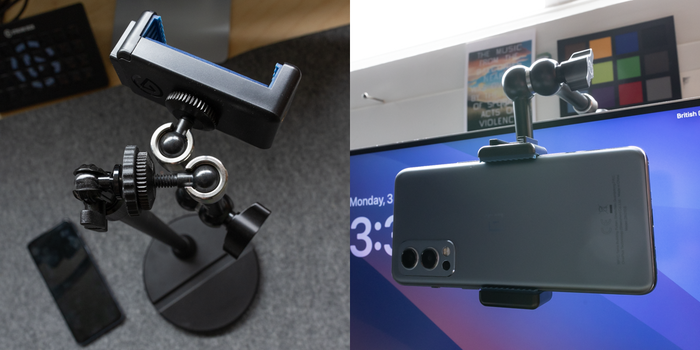
A magic arm can add useful extension to any sturdy stand.
Magic arms come in a variety of sizes, and can also have clamp attachments that open up even more mounting options for your phone. For instance, if there‘s a shelf above or behind your computer, you may be able to clamp an arm to it, and forego a stand entirely. Or, if your stand is sturdy enough, you can clamp an additional arm directly to its trunk and mount, and slap a video light on it. The options really are endless, and I don't get tired of trying out fresh orientations with my little magic friends.
####Phone holders####
When you purchase a mount - either an arm or a stand - it may or may not come with a phone holder. It‘s not necessarily a bad thing if it doesn‘t - phone holders vary widely in quality, ease of use, and phone friendliness, and I’ve found that the ones included with inexpensive mounts are often the weakest point of the phone mounting experience. The cheapest ones will break easily, or scratch your phone. All of them will take unwanted screenshots or try to call emergency services when you inevitably clamp them over the side buttons on your device.
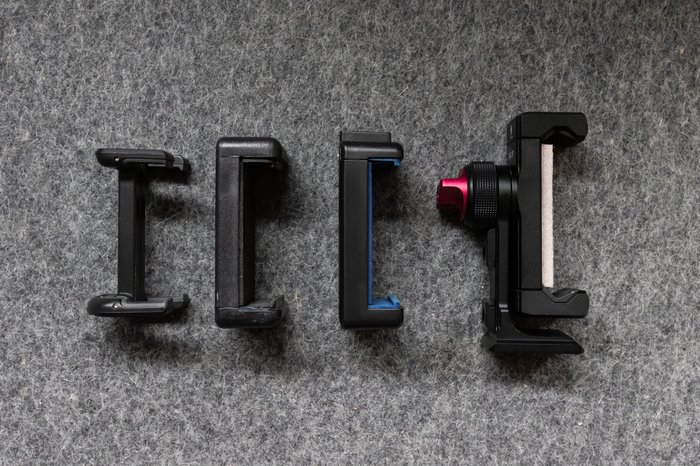
Claw-type phone holders can vary widely in size and build quality. From the left: the folding Joby GripTight One mount, the Tarion phone holder (bundled with the floating arm mount), the Elgato phone grip (bundled with the Mini Mount) and the Ulanzi ST-27.
This leaves you with three choices. The first is to accept with zen-like calmness the fiddly nature of these claws, keep your phone protected by a case when mounting it, and simply take extra care when inserting your phone to keep the side buttons away from its hungry teeth.
The second option is to upgrade from cheaper spring-loaded claws to something more robust, such as the Ulanzi ST-27 (£36/$30). The ST-27‘s certainly not cheap, but inserting a phone with even the thickest case attached is a smoother process, and I can easily change its orientation with a quick turn of my wrist. For some reason it has rubber teeth, but not a padded back, so to protect my phone, I‘ve attached a small adhesive rectangle of felt padding.
The final option is one reserved only for those who use an iPhone with MagSafe capabilities. Instead of a claw-type holder, you can instead opt for a simpler, low-profile mounting disc like this one from Neewer (£21/$20). Just screw it to the ball head of your arm or stand mount (or the end of your magic arm), and you‘ll be able to just click your phone into place, no wrestling required. For Android users, discs like this one also often come with a little adhesive ring that supposedly makes any phone MagSafe compatible, but in general, I don‘t recommend sticking something directly to your phone, unless you don‘t mind some cosmetic damage.
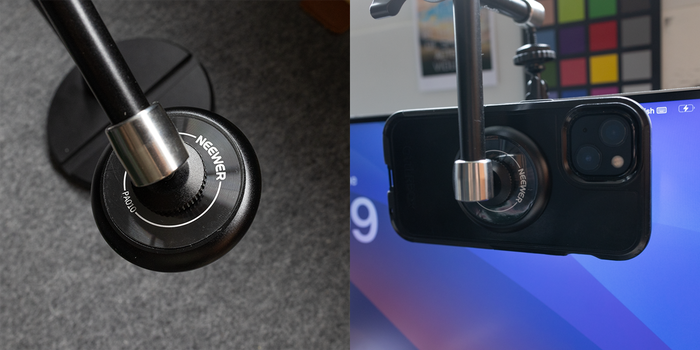
Simple MagSafe attachments like this one from Neewer can make it quick and easy to press your iPhone into action as a webcam.
Even for iPhone users, though, my recommendation of a MagSafe mounting disc comes with a reservation. Inevitably, whenever I mount an iPhone via this MagSafe option, I wonder if I shouldn‘t just be charging it at the same time, leaving me to meet or work with video without worrying about battery life. But alas, a simple MagSafe accessory that holds your iPhone at eye level while simultaneously charging it doesn‘t yet seem to exist, apart from some improvised 3D-printed holders on Etsy.
Ultra-compact mounts
Of course, there may come those moments where you simply don‘t have the space or time to mount your phone with any of the options I‘ve recommended to this point. If what you need is something quick and pocketable to use with your laptop while on the road, there are a couple of decent options.
Strictly for iPhones with MagSafe, there are compact models like Belkin‘s MagSafe mount (£29/$28), which debuted a couple of years ago alongside the release of macOS Ventura’s Continuity Camera feature. While there is of course plenty to say about how Continuity stacks up against Camo, I‘m happy to say that the Belkin mount and others like it work no matter what video software you‘re using.
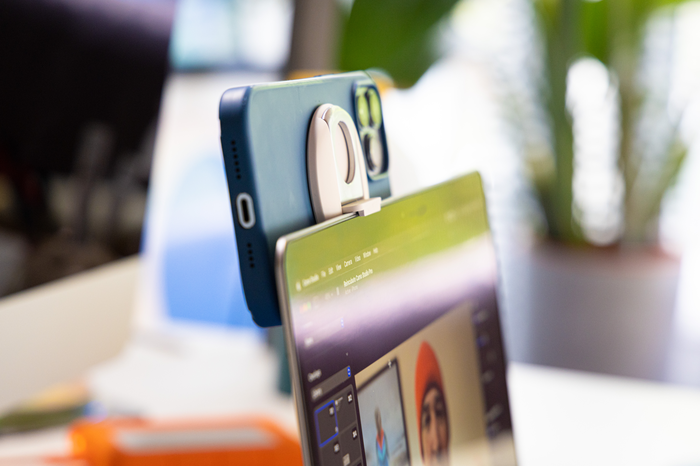
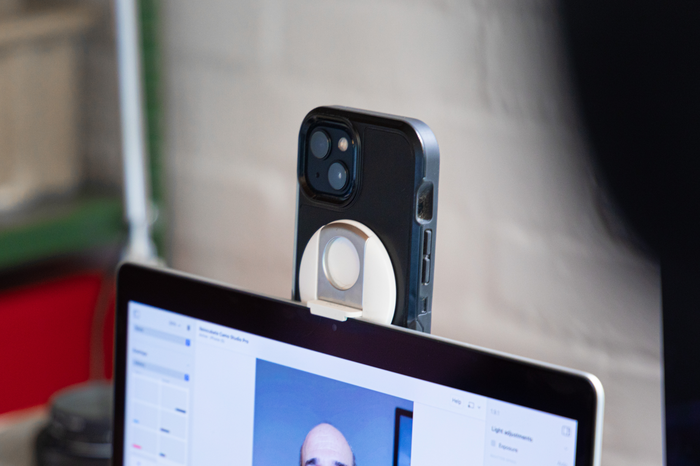
That‘s an iPhone 13 Max mounted in landscape on a MacBook Air on the left, and an iPhone 13 in portrait on a MacBook Air on the right.
Once you’ve attached your phone to the mount, it‘s easy to then perch it atop your screen. For most users, this means that your video will be captured from a point well below eye level, so I recommend placing the laptop on some books or some other small improvised plateau. Doing this is also about practicality - raising your laptop will keep its screen as close to vertical as possible, something I found to be fairly important when using both of the mounts in this category. As you might expect from hanging something as substantial as an iPhone to the top or side of your MacBook screen, the centre of gravity shifts quite dramatically as the screen moves away from perpendicular.
For Android users, the best compact option I‘ve used is a credit card-sized, foldable mount like this one from Tagplus. When you don‘t need it, it can sit in your wallet with the rest of your card collection. Then when it‘s time for video, you just take it out, fold its larger arms outward to hold your phone, and its smaller arms inward to grip the top of your laptop screen. It‘s not the most robust piece of tech, but I‘ve yet to see mine show any sign of wear after a year and half of casual use. One final thing to note, however - for both this and any other other mount option that sits directly on your laptop screen - is that typing on a laptop keyboard while one of these is mounted will likely result in some camera shake. For this reason, and also because they require the additional step of raising your laptop to get a good angle, I recommend ultra-compact mounts only for those situations in which they‘re absolutely necessary.
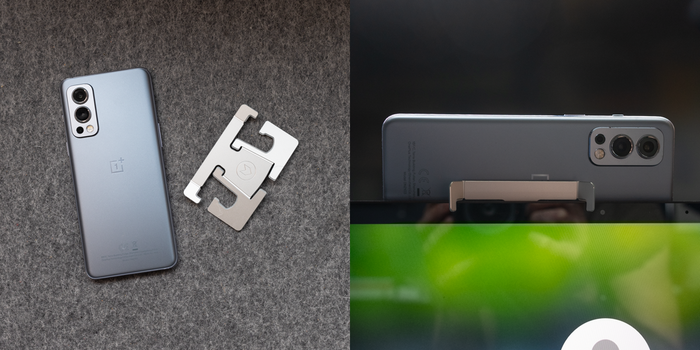
Ultra-compact mounting options like this credit card-sized option from Tagplus will accommodate most phones and laptops.
Mount DIY
And now for the final frontier of phone mounting: DIY. Maybe you‘ve looked at all the options I've talked about here, and thought you could do better. Maybe you don‘t want something that a thousand other people have. Maybe you have a pile of Lego bricks sitting around, and are feeling inspired. Maybe you‘re bored.
Out of such fertile ground, inspiration springs. Over the years, many users have shared their one-of-a-kind creations with us, and in hopes that they might in turn inspire you, I‘m sharing a few here. If you do make one of your own, please send us a few pics, with or without an investor prospectus.
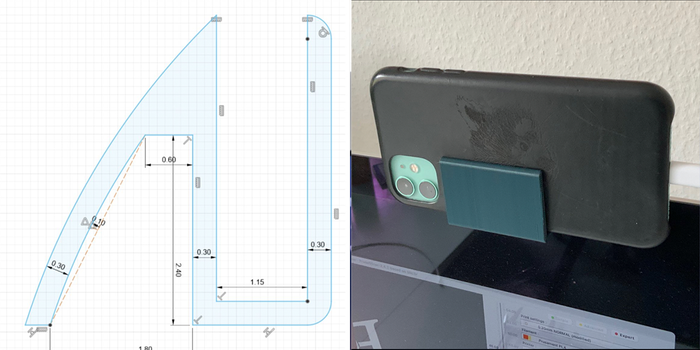
This minimalist marvel was shared with us on Twitter by @SherlockHans. It was designed in Fusion 360, and then converted to another format for 3D printing.
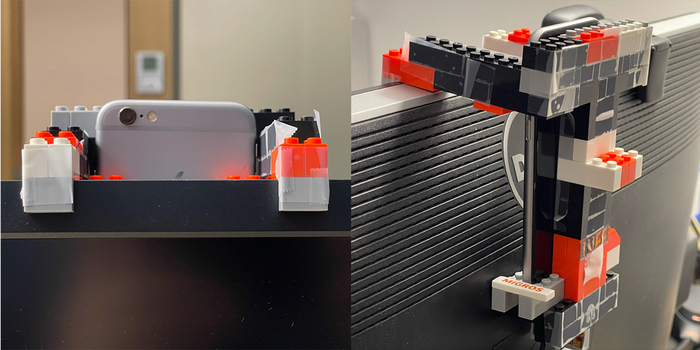
This engineering feat is a Twitter share from @boris_pavlocic. Media: Lego and scotch tape.
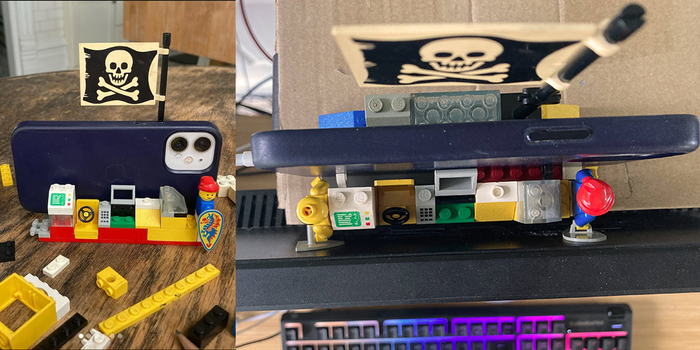
The Net Scape Raft Videocam Support System.™ Captain: HyperTextHero.