

If you find yourself needing to restore a backup from a device with a newer version of iOS than the target device, you'll need to be aware that restoring a newer backup to a downgraded iOS device isn't possible without a few tweaks. If you try without, you'll see this message:
iTunes could not restore the iPhone "Renate's iPhone" because the backup was corrupt or not compatible with the iPhone that is being restored.
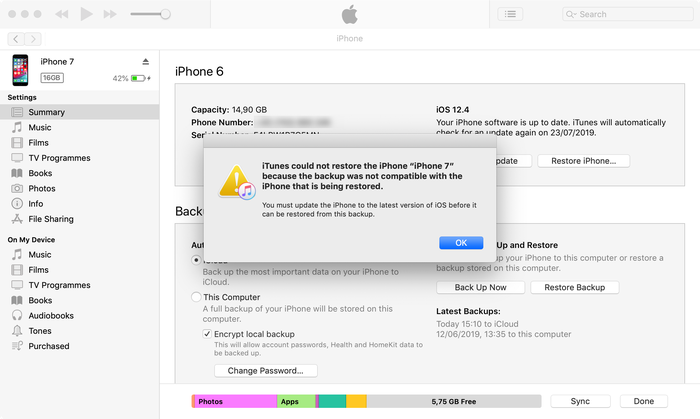
Trying to restore an iOS beta backup to an older version of iOS
What are your options, then? Well, there's two:
- Patch your backup to make it compatible with the earlier iOS, or
- Pull the data you need from your iTunes or iCloud backup, and import it
We describe how the first technique below, and our guide on backup recovery covers the second technique.
How to patch downgrade an iOS backup version
Patching a backup for an iOS downgrade is pretty straightforward, although it isn't possible to move between just any version. We've highlighted the version downgrades that we've tested and know are working below.
Step 1. Take a copy of your iOS backup before you modify it.
Step 2. Open the Info.plist file in the root folder of your backup.
You can open this file with any simple text editor.
Step 3. Search for Product Version, and you'll find a section that looks like the text below.
<key>Product Type</key>
<string>iPhone10,6</string>
<key>Product Version</key>
<string>12.3.2</string>
<key>Serial Number</key>
<string>C8QH6T96DPNG</string>
Step 4. Change the Product Version value and save the file.
For example, from 12.1.3 to 12.1 or 12.0 and save the file.
Which backup versions are possible to downgrade from?
It may be that other version downgrades work, but these are the ones we've tested and confirmed working. This technique relies on there being little different to the underlying storage format between some versions. If you have success with other versions, please let our readers know in the comments below.
| iOS version | Backup downgrade confirmed for |
|---|---|
18 beta 2 | 17.5.1 |
16.2 | 16.1.2 |
14 beta | 12.4.6 |
13.6 | 13.5.1, 13.5, 12.4.8 |
13.5.1 | 13.5, 12.4.6 |
13.5 | 12.4.71 |
13.4.1 | 12.4.7 |
13.4 | 13.3.1, 12.4.7 |
13.3.1 | 13.3 |
13.3 | 13.2.3, 12.4.4, 12.3.3 |
13.2 | 12.3.4 |
13.1.3 | 12.3.3 |
12.3.2 | 12.3.1 |
12.1.3 | 12.1.2 |
12.1.3 | 12.1, 12.0 |
12.0 | 11.4 |
9.0 beta | 8.4 |
8.0.1 | 8.0 |
8.0 beta | 7 |
7.0 | 6.1.4, 6.1.3 |