Camo Studio 2.8 is one of the biggest releases we’ve shipped yet. It delivers new audio controls for Windows users, and a number of new streaming features and other improvements on Mac.
Here are the highlights: On Windows, Camo now supports audio mixing, combining support for multiple sources with noise reduction and equalising tools. On macOS, new web and chat layers join multistreaming support to add versatility and reach to your streams, while scene transitions and an all-new recording gallery help you create polished, multi-scene video sequences right in the app. There's also a beefed-up Scene Editor, native support for Elgato Stream Decks, refreshed Liquid Glass look, and more. Watch Eden’s video below to see the new macOS additions in action, and read on for a closer look at everything that’s new and improved.
What’s new in 2.8
Mixing it up on Windows
Audio mixing has officially arrived in Camo Studio for Windows. You can now blend multiple audio sources directly into your setup - including microphones, sound effects, system audio, and specific application or game audio - to help your video sound as good as it looks.
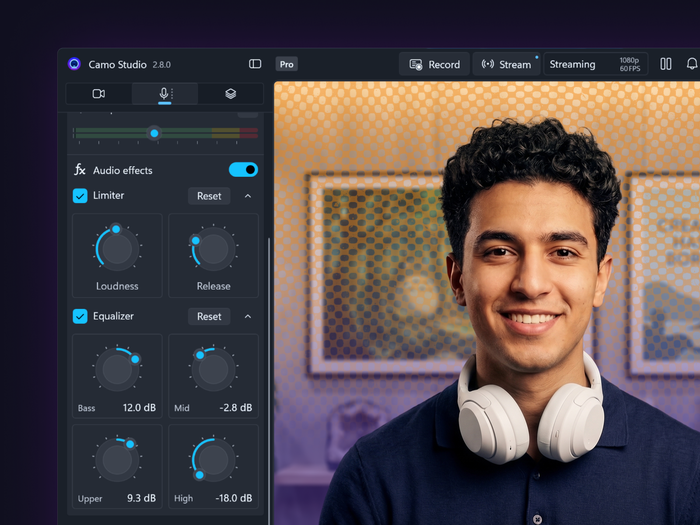
The new audio tools in Camo Studio on Windows
To help keep your audio balanced, we've built in granular control over each source. Adjust individual volume levels so your voice always sits clearly above background music or gameplay, toggle on noise reduction to ensure your audience hears you clearly, and fine-tune your overall sound profile using the new equalizer.
Once your mix is dialed in, you can use it to record and stream right in Camo. You can also use your newly configured output in apps like Zoom or OBS, by simply selecting Camo Microphone when connecting to them.
Boosting broadcast on macOS
We think this release turns Camo Studio on your Mac into a true broadcasting heavyweight (Windows users, don't worry: we're working hard to bring these new features to you, as well). To start, there are new layer options - with web layers, you can now add alerts and even embed live web pages to your scenes, while chat layers bring incoming messages from your audience directly into your video.
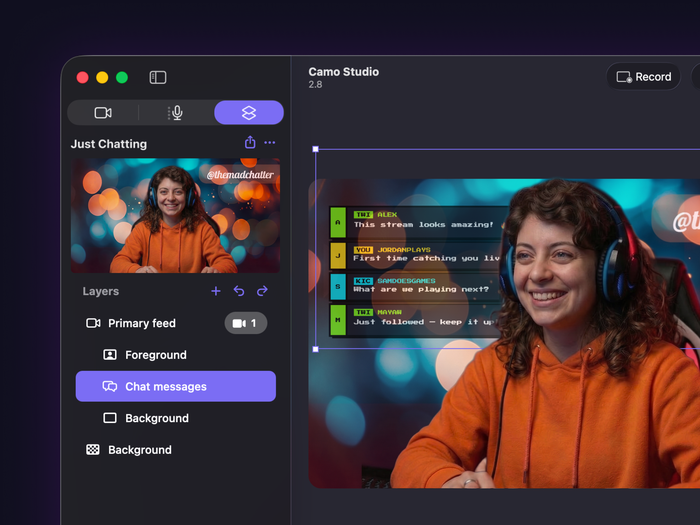
A chat layer added to a Camo scene
To help you increase your reach, we’ve paired this dynamic, interactive upgrade with one of our community’s most requested features: multistreaming. Now you can connect multiple accounts for simultaneous broadcast to platforms like Twitch, YouTube and Kick, reaching your audience wherever they are. We’ve also added a streaming history view to let you easily track stats and details from your previous sessions.
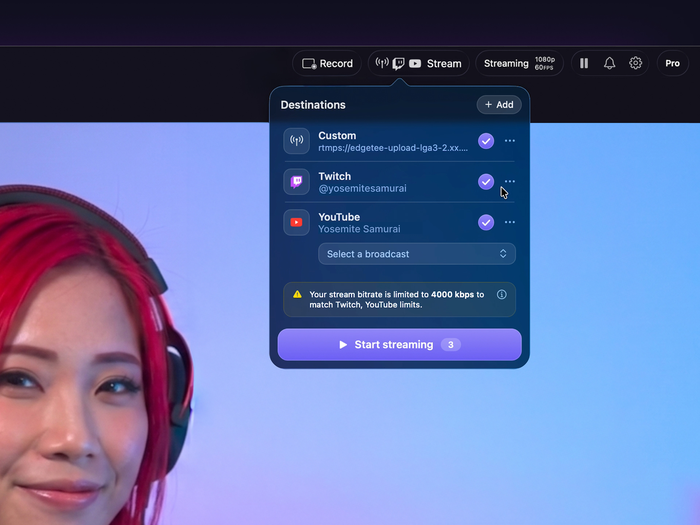
Camo's streaming destination drop-down
Polished video, no additional editor needed
This update also gives Camo users new editing powers on Macs, for both live video and recordings. When streaming live, you can now choose any of 24 transition styles for seamless scene switching and cuts between angles or graphics. Set a global transition with custom duration for all scenes, or scroll through the new transition gallery to preview and pick tailored looks for individual scene changes.
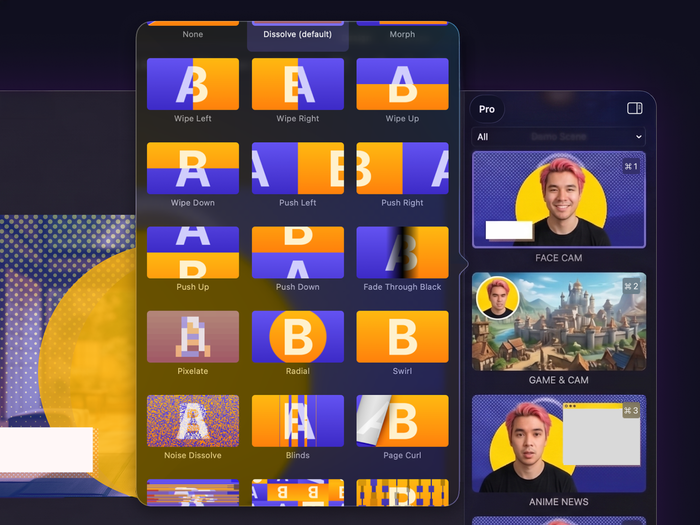
Camo's transitions gallery
For those creating recorded content, the process is just as simple. After shooting your individual clips with the help of the new recording countdown, just open the brand-new recording gallery to arrange your recorded clips on an intuitive storyboard, trim them, add transitions and export the finished sequence directly from the app.
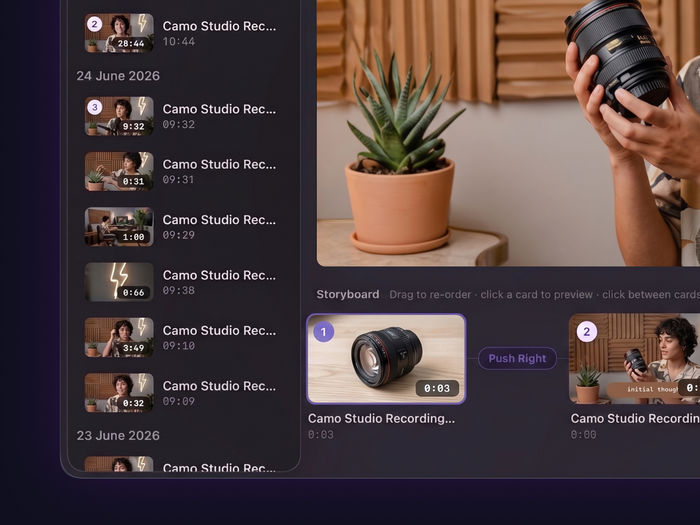
The Recording gallery and storyboard
Dynamic scenes and additions to the toolbox
Beyond web and chat layers, the creative experience on macOS gets a further upgrade in depth and flexibility. The Professional section of our Explore gallery now features three new templates with a new background and foreground layering format - you can use them as is, or craft your own design by splitting your video layer to place your chat, web pages, graphics, or other elements between you and your background. Try adding a colour, texture, or even a video loop, and then reduce its opacity for a look that adds interest to your scene while keeping the viewer's focus on you.
Once they're in place, you can refine your scene further with the help of some new editing tools designed to streamline your workflow. These include:
- Layer groups: Organise related elements together in the scene editor for more efficient movement and refinement.
- Alignment guides: Snap layers into the perfect position with confidence while moving them around.
- Off-canvas interactivity: Layers extending outside the canvas now show grabbers and stay fully interactive.
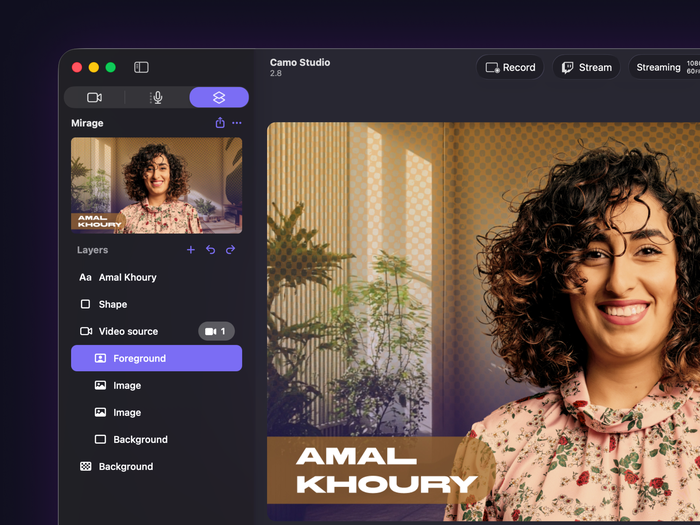
One of Camo's new split-video scenes
Stream Deck support
To add even more versatility to your Mac setup, this update includes a dedicated plugin that enables direct control over Camo with Elgato's powerful Stream Decks. Once you've opened Camo and connected your Stream Deck to your machine, just go to the Stream Deck app to set your Camo action key layout. You'll get instant, one-touch shortcuts that cover every part of your video workflow, from scene building to camera switching to live streaming and beyond.
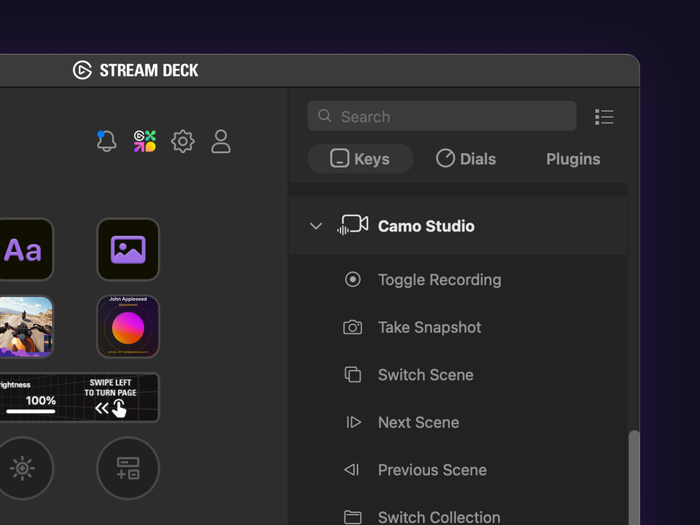
Camo's configurable actions in Elgato's Stream Deck app
A polished new look and more
Finally of these changes on Mac come wrapped in a complete visual overhaul - we’ve refreshed Camo Studio’s entire appearance to match macOS's gorgeous Liquid Glass design language, ensuring it looks right at home on your screen.
Those are the biggest changes, but there's plenty more to discover in this update. For a complete rundown of everything that's new, improved, and fixed, head over to our full Windows and Mac release notes.
As always, thank you for being part of the Camo journey. We can't wait to see the magic you make with Camo Studio 2.8!
Update (4 August 2026): The original blog post has been updated to reflect the deployment of Camo Studio 2.8 on Windows.